
GoSweetSpot Shipping website integration
GoSweetSpot Website Integration.

Reduce the time and administration between syncing data from your eCommerce website with GoSweetSpot - now even more effortless Shipping for everybody
GoSweetSpot, the leading courier and freight aggregator in New Zealand, offers a comprehensive selection of domestic and international shipping services. By presenting consolidated pricing for easy comparison, they empower businesses to make informed choices.
With the seamless integration of GoSweetSpot and Oncord, your will gain the ability to select from a diverse range of carriers and services, enabling you to compare prices conveniently during the checkout process.
Once an order is placed on your Oncord website, it can be effortlessly transferred to GoSweetSpot for further processing. By utilizing the GoSweetSpot app, you can effortlessly generate shipping labels, schedule pickups, and have the designated courier collect the order..
Once GoSweetSpot is setup, you will be able to easily choose from different rates depending on their location and available services.
To initiate this shipping integration, simply create a merchant account on the GoSweetSpot website and contact us on how to get started with this time saving integration
Push a Shipment to GoSweetSpot
Once a sale is made, you can fulfill the shipment using GoSweetSpot. Here's how:
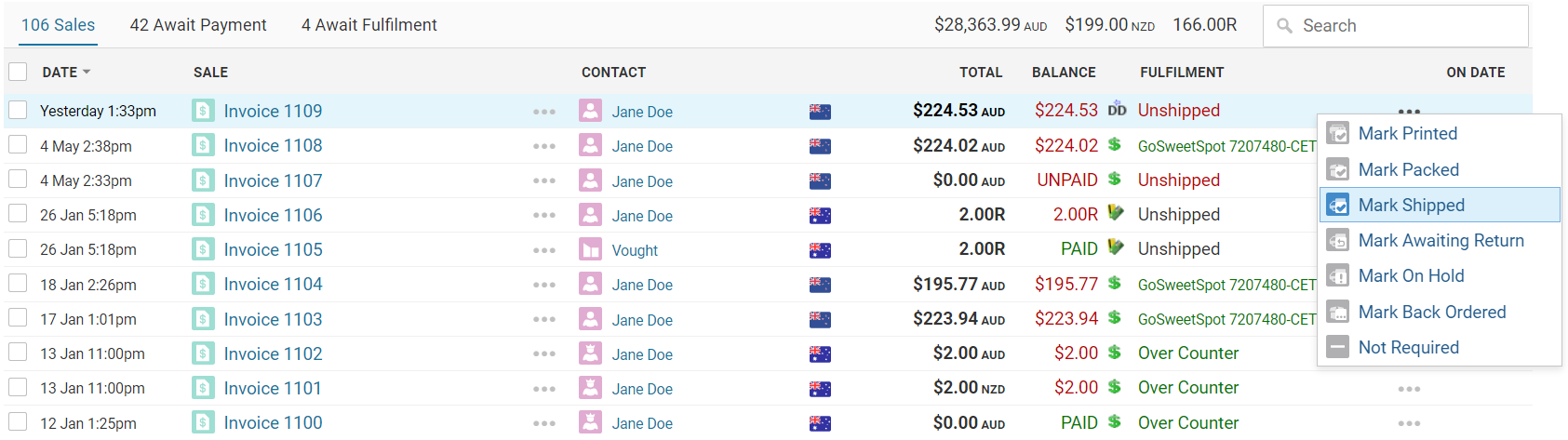
- Within Oncord, navigate to Dashboard > Commerce > Sales.
- Click the fulfillment menu for an invoice.
- Select the "Mark Shipped" option.
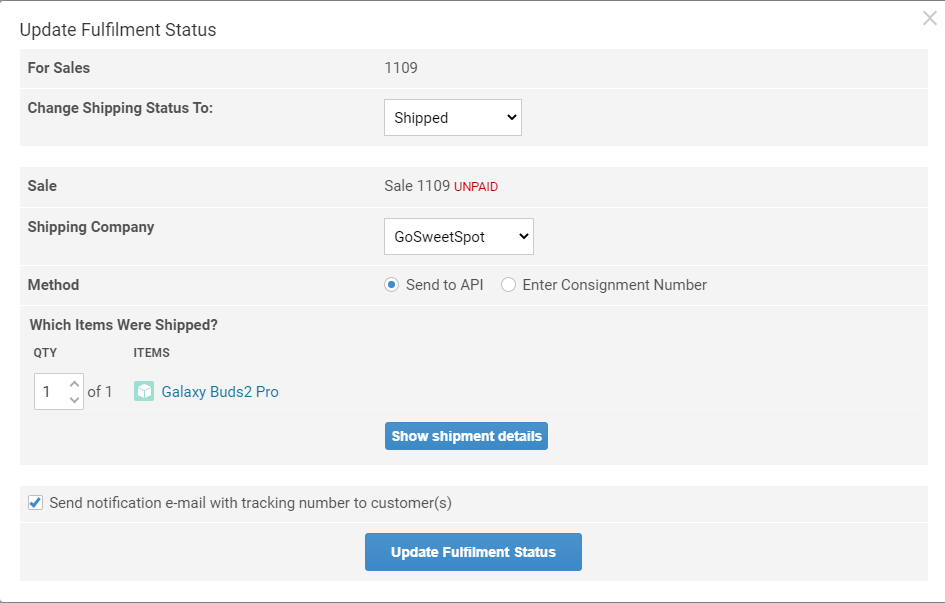
A dialog box will appear, prompting you to proceed. Click the "Update Fulfillment Status" button to confirm the shipment fulfillment.
Once this is done, GoSweetSpot will assign a unique consignment number to the shipment.
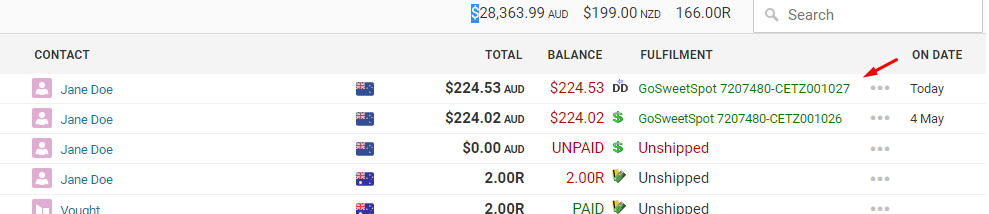
You can conveniently track the shipment's progress by clicking on the "Track Shipment" button, which can be found in the shipping status section of the sale.
In addition, you can also view the shipment push within the GoSweetSpot admin dashboard. Simply go to ship.gosweetspot.com/tracking and apply a date filter to locate the desired shipment.
Let's Have a Chat
Would you like to save time and money syncing data between your website and GoSweetSpot? Would you like a website that looks great, handles all your online eCommerce, your customer data, handles all your outbound email (and SMS) marketing, and even adds email Automation?
Fill in the contact form or call us on 0800 FUEL ME (09 428 3047) to see if our GoSweetSpot website integration can help your business.